
Freight forwarding is built on movement. Cargo moves across ports, airports, borders, warehouses, and final destinations. Documents move between customers, carriers, agents, customs brokers, and finance teams. Rates move from carrier platforms to pricing teams, then into quotations, offers, bookings, shipments, invoices, and reports. But while the cargo may be moving forward, the internal workflow inside many freight forwarding companies still gets stuck in manual steps.
A customer sends an inquiry by email. A salesperson checks rates manually. A quote is prepared. When the customer accepts, the same information is entered again into a booking or shipment. Documents are collected through email, WhatsApp, shared folders, and sometimes someone’s desktop. Operations teams chase shipment updates, finance waits for cost and invoice details, customers ask for status updates, and management asks for reports. The shipment may be moving, but the workflow around it is often held together by follow-ups, spreadsheets, and memory. Not exactly the digital dream.
So, when freight forwarders ask, “What is the best freight forwarding software for workflow automation?”, the answer should not be based on the longest feature list. The best freight forwarding software is the one that connects the full operational chain: sales, pricing, bookings, shipments, documents, milestones, customer communication, carrier integrations, finance, accounting, reporting, and now AI-assisted document handling. Key features of freight forwarding software include real-time tracking, automated documentation, compliance monitoring, and integrated financial management, which are necessary for modern logistics operations. Best practices when evaluating freight forwarding software include prioritizing features that eliminate manual data re-entry and consolidate fragmented systems. For freight forwarders looking for that connected operational flow, Logistaas is built to automate the work between the work.
What does workflow automation mean in freight forwarding?
Workflow automation in freight forwarding means turning repetitive manual tasks into structured, trackable, and connected system flows. It is not just about automatic reminders or digital shipment records. Real workflow automation means that information can move from one stage to another without being retyped every time, while tasks, documents, milestones, customer actions, financial updates, and reports remain visible inside one system.
In practical terms, workflow automation can include AI document reading, inquiry and quotation management, offer-to-booking conversion, shipment milestone tracking, customer action requests, document exchange, shipment status updates, carrier submissions, electronic air waybill submissions, invoice workflows, currency exchange updates, automated reporting, and sales follow-up reminders. The key word is connected. A feature alone is useful, but a connected workflow is powerful. Cloud-based freight forwarding software solutions allow businesses to expand globally without system limitations, enhancing scalability and operational efficiency.
This is where Logistaas becomes especially relevant. Logistaas’ Digital Freight Forwarder Plan is built around connected operations, bringing pricing, booking, shipping instructions, documents, visibility, invoicing, and more into one unified platform. Instead of forcing teams to manage each step in isolation, Logistaas helps freight forwarders operate through a more complete digital workflow.
Why workflow automation matters for freight forwarders
Freight forwarding is not one simple process. It is a chain of dependent actions, and every delay or missing detail can create consequences. One missing document can delay clearance. One missed milestone can frustrate a customer. One incorrect rate can damage margin. One manual entry mistake can create an invoice dispute. One forgotten follow-up can lose a booking.
This is why workflow automation matters. The goal is not only to make teams faster. The bigger goal is to make operations more reliable. A strong freight forwarding system should help teams understand what needs to happen next, who is responsible, what has been completed, what is delayed, what the customer needs to provide, and what can be automated instead of manually chased.
If software only stores shipment data, it is useful but limited. If it helps move work forward, trigger actions, connect departments, reduce duplicate entry, and improve visibility, then it becomes a true workflow automation platform. That distinction matters because freight forwarders are not just managing shipments. They are managing hundreds of small operational decisions around every shipment.
Why Logistaas is a strong choice for workflow automation
Logistaas is a Transportation Management System designed specifically for freight forwarders. It brings sales, pricing, operations, finance, customer communication, integrations, reporting, and customer portal workflows into one connected platform. This matters because freight forwarding workflows do not live in one department. Sales creates the opportunity, pricing builds the offer, operations manages the shipment, customers provide documents and instructions, finance handles invoices and payments, and management needs visibility across everything.
Logistaas helps connect these moving parts so freight forwarders can reduce manual work, improve visibility, and manage operations in a more structured way. It is not just shipment software. It is a workflow platform for freight forwarders that supports the full process before, during, and after a shipment.
Key workflow automation areas in Logistaas
1. Averroes AI and AI document reader automation

AI-powered platforms use advanced technology to extract data from commercial invoices and bills of lading PDFs to pre-populate shipment fields. One of the most important workflow automation areas in Logistaas is Averroes AI. This should not be described as generic AI sprinkled on top of a TMS. That would be lazy, and freight forwarders have already seen enough “AI-powered” claims that mean very little in daily operations. Averroes AI is better understood as an AI assistant inside Logistaas that helps freight forwarders reduce manual work and move faster through shipment-related tasks.
A key part of this is the AI Document Reader. Freight forwarders handle large volumes of shipment documents every day, including Bills of Lading, and Air Waybills. Traditionally, users need to open the document, read the details, identify the relevant shipment information, and manually enter or update data inside the system. That process is slow, repetitive, and vulnerable to human error.
With Averroes AI, Logistaas can support document automation by reading B/L and AWB PDF documents, extracting important shipment information, and helping import that data into existing shipment records. That means documents are no longer just static files attached to a shipment. They become useful operational data that supports faster processing, cleaner shipment records, and fewer retyping mistakes.
This is where AI becomes practical in freight forwarding. It is not vague AI, decorative AI, or “AI-powered” because someone added a sparkle icon. It is AI applied to one of the most manual parts of the business: document handling. For freight forwarders, Averroes AI supports workflow automation by turning document review from a manual reading-and-typing task into a more structured, AI-assisted flow.
2. Milestone automation

Milestones in freight forwarding are not just status labels. They are the operational checkpoints that keep a shipment moving from one stage to the next.
In Logistaas, milestones help teams structure the shipment journey and track progress across key operational events. Instead of depending on memory, manual follow-ups, scattered emails, or someone saying “I think it was updated yesterday,” teams can follow shipment progress through a clear sequence of milestones.
This matters because freight forwarding workflows are full of dependencies. One milestone being delayed can affect the next action, the next department, and the customer’s expectations. If cargo is not picked up, documents may not be ready. If documents are not received, clearance may be delayed. If arrival is not updated, the customer may start chasing the operations team. The milestone is not just an update; it is a signal that something has happened, or that something still needs attention.
Logistaas helps make that progress easier to monitor. Operations teams can use milestones to see what has been completed, what is pending, and where attention is needed. This gives the team more control over daily execution and reduces the need to manually chase every shipment update.
The real value of milestone automation is not only that it shows where a shipment is. It helps the company manage what should happen next. For operations, it creates accountability. For customers, it improves visibility. For management, it turns shipment progress into something measurable instead of something hidden inside conversations.
In simple terms, milestones help Logistaas turn shipment handling from a reactive process into a structured workflow. The team does not just wait for problems to appear. They can track progress, notice delays earlier, and keep the shipment moving from one operational step to the next.
3. Quote-to-booking automation

One of the biggest workflow problems in freight forwarding is duplicate data entry. A salesperson creates a quote, the customer accepts, and then operations often has to re-enter the same information to create a booking or shipment. That wastes time and creates room for mistakes, especially when shipment details, charges, routes, or customer instructions are copied manually.
Logistaas connects offers, bookings, and shipments so the commercial workflow can move more naturally into operations. Through the customer portal, clients can make booking requests directly from valid offers, and the company receives an already created shipment with a Pending Booking status. This turns the quote into the start of the operational flow rather than a disconnected PDF sitting in someone’s inbox.
The value here is simple: faster handoff, less duplicate entry, and fewer mistakes between sales and operations. When the offer, booking, and shipment are connected, the workflow becomes cleaner and easier to manage.
4. Customer action automation

Freight forwarders constantly need things from customers, including missing documents, shipping instructions, approval on charges, shipment confirmations, payment-related information, and additional cargo details. Without automation, this becomes a long chain of follow-up emails. First comes the reminder, then the gentle reminder, then the very gentle reminder, then the “please save us from this inbox archaeology” reminder.
Logistaas helps make customer actions more structured. Customers can view required actions and respond through the portal. This turns customer communication into a workflow instead of an inbox chase. When customers know exactly what is required from them, and the operations team can track whether it has been completed, the whole process becomes easier to manage.
This matters because customer delays often become operational delays. A structured customer action workflow reduces ambiguity, improves accountability, and helps teams move shipments forward with fewer manual follow-ups.
5. Document exchange automation

Documents are the bloodstream of freight forwarding. But in many companies, documents are scattered across email attachments, WhatsApp messages, shared drives, desktop folders, printed copies, and the legendary folder called “Final Final New Version 3.” When documents are scattered, teams waste time searching, checking versions, and confirming whether the right file has been received.
Logistaas helps customers upload and download shipment documents through the customer portal, keeping documents connected to shipment records. This improves workflow automation because teams do not need to search across disconnected channels. The shipment becomes the central place where related documents can be found, shared, checked, and used.
The result is better traceability, faster access, fewer delays, and smoother collaboration between freight forwarders and their customers. Document exchange may sound basic, but when it is connected to the shipment workflow, it becomes one of the most practical automation improvements a freight forwarder can make.
6. Shipment tracking and visibility automation
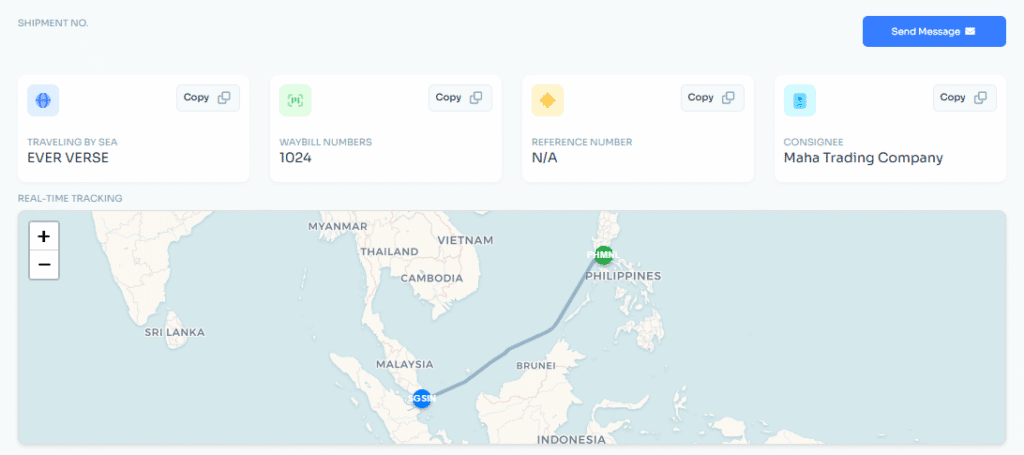
Customers do not want to ask for shipment updates every day. They want visibility. Operations teams also do not want to answer the same status question ten times a day, because nobody joins freight forwarding to become a human tracking link.
Logistaas supports shipment tracking and visibility through connected workflows and integrations. Logistaas can support real-time shipment date updates and alerts, automatic shipment status updates, tracking dashboards, route and destination management, cargo weight discrepancy alerts, and CO₂ emissions tracking. This matters because visibility without automation is still manual work. The real value comes when shipment data updates automatically and becomes available to internal teams and customers.
Better visibility helps teams act earlier when something changes. It also reduces manual customer follow-up because shipment updates are easier to access and share. In a market where customers expect transparency, shipment visibility is no longer just a bonus feature. It is part of the service experience.
7. Shipping instruction automation

Shipping instructions are another area where manual work creates friction. When instructions are handled across emails, documents, and carrier platforms, teams spend unnecessary time copying, checking, and submitting information. This creates delays and increases the risk of inconsistent data.
Logistaas supports shipping instruction workflows through integrations such as INTTRA. Users can submit booking requests and shipping instructions through Logistaas to connected carriers via INTTRA. This helps reduce the gap between customer instructions, internal operations, and carrier submission.
The workflow becomes more connected because customer instructions can move into operational review and carrier submission without unnecessary platform-hopping. That means less copy-paste, better structure, and clearer shipment records.
8. eAWB and carrier submission automation
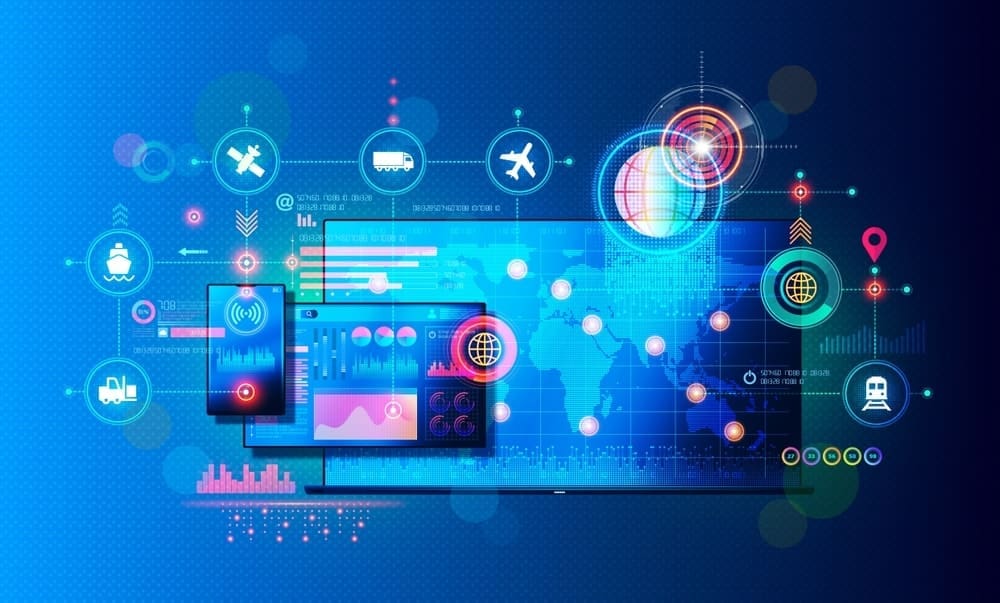
For air freight forwarders, electronic air waybill submission is a major automation opportunity. Manual air waybill submission can be repetitive, time-consuming, and sensitive to errors, especially when teams manage high shipment volumes.
Logistaas integrates with platforms such as Traxon CargoHUB, allowing electronic FHL and FWB message submissions to connected carriers. This helps air freight teams streamline submission workflows and reduce manual handling.
One AWB may feel like a task. Hundreds of AWBs become a process problem. That is exactly where automation should help: not by making operations flashy, but by making repeated operational work faster, cleaner, and more consistent.
9. Rate and pricing workflow automation

Pricing is one of the most painful parts of freight forwarding because rates come from different sources, spot rates change quickly, carrier emails pile up, sales teams need to respond fast, and margins need to be protected. When pricing depends on scattered emails, PDFs, and spreadsheets, the quote process becomes slow and inconsistent.
Logistaas supports pricing workflow automation through integrations such as WebCargo and CargoFive. WebCargo allows users to access spot air cargo rates and book through the integration, while CargoFive helps centralize ocean freight spot rates, compare offers, check schedules, standardize pricing data, and import valid quotes into the Offers module.
This matters because quotation speed directly affects sales performance. When a customer asks for a rate, they are probably not waiting patiently while your team opens six spreadsheets and whispers motivational quotes at the screen. They are likely asking other forwarders too. A faster pricing workflow helps sales teams respond faster, reduce manual rate entry, and improve quote accuracy.
10. Finance and invoicing workflow automation

Freight forwarding finance is not generic accounting. It involves shipment-linked costs, receivables, payables, debit notes, credit notes, vendor invoices, customer invoices, multiple currencies, tax rules, and financial reporting. If finance is disconnected from operations, teams end up doing double work and reconciling information manually.
Logistaas includes a native accounting module designed for freight forwarders, helping reduce complex integrations and double work between operational and accounting systems. This matters because finance should not operate separately from shipments. When accounting is connected to operations, freight forwarders can manage invoices, payments, expenses, and reports more efficiently.
Logistaas also supports e-invoicing workflows through Avalara. Invoices and credit notes issued in Logistaas can be transferred to Avalara for e-invoicing, and vendor invoices from the same tax network can be received as draft received invoices in Logistaas. This is workflow automation because it reduces manual invoice handling, improves compliance workflows, and keeps financial data connected to the operational process.
11. Currency exchange automation

International freight forwarding depends heavily on currencies. Exchange rates affect quotations, invoices, margins, receivables, payables, and financial reporting. Manually checking and updating exchange rates is exactly the type of repetitive task that software should handle, preferably before anyone has had to open another browser tab before coffee.
Logistaas integrates with XE.com for daily exchange rate refreshes and allows users to add an automatic fixed margin to selling exchange rates. This supports finance workflow automation by helping teams work with updated currency data and more standardized selling rates.
It may sound simple, but simple automation is often where real efficiency starts. Not every automation needs fireworks. Some just need to quietly remove repetitive work from the day.
12. Reporting automation

Reports should not require rebuilding the same spreadsheet every week. When reporting depends on manual exports, filtering, formatting, and email sending, teams lose time and management receives information later than needed.
Logistaas supports dynamic volume and financial reports, saved report templates, and automatic report generation and sending. That turns reporting from a manual task into a management workflow. Instead of repeatedly preparing the same reports, teams can rely on saved templates and automated delivery.
This creates a stronger reporting rhythm across the company. Weekly visibility, monthly performance tracking, customer reporting, and internal accountability become easier to manage. Good reporting automation does not just save time. It helps leadership make decisions with more consistent information.
13. Sales workflow automation

Freight forwarding sales teams do not only need a place to store customer names. They need a connected sales workflow that links customer activity to inquiries, quotations, opportunities, bookings, shipments, and customer history.
Logistaas allows sales users to log visits, calls, and emails, set reminders, create inquiries and quotations, add opportunities, and link them to inquiries, offers, bookings, and shipments. It also provides sales reports showing customer history, potential opportunities, secured volumes, sales user activities, quotation analysis, and inactive or unfollowed clients.
This matters because in freight forwarding, sales does not end when the quote is sent. The sales process connects to pricing, operations, customer service, finance, and long-term customer development. With workflow automation, sales teams can track follow-ups, monitor inactive customers, identify opportunities, and connect commercial activity to actual operational results. That is much stronger than a lonely CRM note saying, “Client interested.” Interested is not revenue. Booked shipments are revenue. The system should help move one toward the other.
What should freight forwarders look for in workflow automation software?
When evaluating freight forwarding software, companies should avoid asking only, “Does it have this feature?” A better question is: does this software improve the way our work moves? Workflow automation should be judged by how well the system connects departments, reduces duplicate work, improves visibility, and helps teams act faster with fewer manual steps.
A strong freight forwarding system should offer connected workflows, not isolated modules. Sales, operations, finance, and customer communication should not feel like separate islands. Inquiries, quotes, bookings, shipments, documents, invoices, and reports should be connected so information moves naturally through the business.
The system should also reduce duplicate data entry. If the same shipment information needs to be entered again and again, the software is not solving the core problem. The best workflow automation software allows data to move from inquiry to quotation, quotation to booking, booking to shipment, shipment to invoice, and invoice to report.
Customer self-service is another major requirement. Customers should not need to email every time they want an update, document, invoice, or shipment status. Logistaas’ portal allows customers to manage offers, bookings, shipments, invoices, documents, and actions from one place. This is not only convenient for customers. It also protects operations teams from becoming a 24/7 update desk.
Freight forwarders should also look for milestone and exception visibility. Automation should not only handle smooth workflows; it should also help identify problems such as delayed milestones, missing documents, pending customer actions, unpaid invoices, incomplete shipment details, or status changes. In freight forwarding, silence is not always good news. Sometimes silence means the update is missing, the document is late, and someone is about to send a very emotional email.
Practical AI is also becoming more important. AI should solve real workflow problems, not decorate marketing pages. For freight forwarders, that means AI should help with tasks such as reading shipment documents, extracting important data, reducing repetitive entry, improving accuracy, and helping users work more efficiently inside the system. This is why Averroes AI is important in the Logistaas workflow automation story.
Finally, strong integrations are essential because freight forwarding does not happen inside one system only. Teams interact with carriers, visibility platforms, rate platforms, customs requirements, accounting systems, email services, and e-invoicing networks. Logistaas supports integrations with platforms such as INTTRA, Traxon CargoHUB, WebCargo, CargoFive, Wakeo, Avalara, XE.com, and Mailgun. These integrations help connect the freight forwarding workflow to the wider logistics ecosystem.
So, what is the best freight forwarding software for workflow automation?
The best freight forwarding software for workflow automation is the one that helps freight forwarders manage the full operational chain in one connected flow. Not just shipments. Not just accounting. Not just a customer portal. Not just a pricing tool. The full workflow.
For freight forwarders that want to automate document reading, milestone tracking, customer actions, quote-to-booking flows, document exchange, shipment visibility, carrier submissions, pricing workflows, invoicing, currency updates, reporting, and sales follow-ups, Logistaas is a strong choice.
Logistaas stands out because it is designed around freight forwarding operations, not generic business processes. It helps teams move away from scattered emails, spreadsheets, repeated data entry, manual customer chasing, and disconnected departmental workflows. More importantly, it gives freight forwarders a more structured way to operate.
Final takeaway
Workflow automation is not about replacing freight forwarders. It is about removing the repetitive work that slows them down. The best freight forwarding software does not just store shipment data. It moves work forward.
That is where Logistaas fits. With connected workflows across sales, pricing, operations, customer portal, documents, milestones, integrations, finance, reporting, and Averroes AI, Logistaas helps freight forwarders automate the work between the work.
So teams can spend less time chasing updates, retyping data, and searching for documents, and more time moving shipments, serving customers, and growing the business.